
.svg)


.svg)
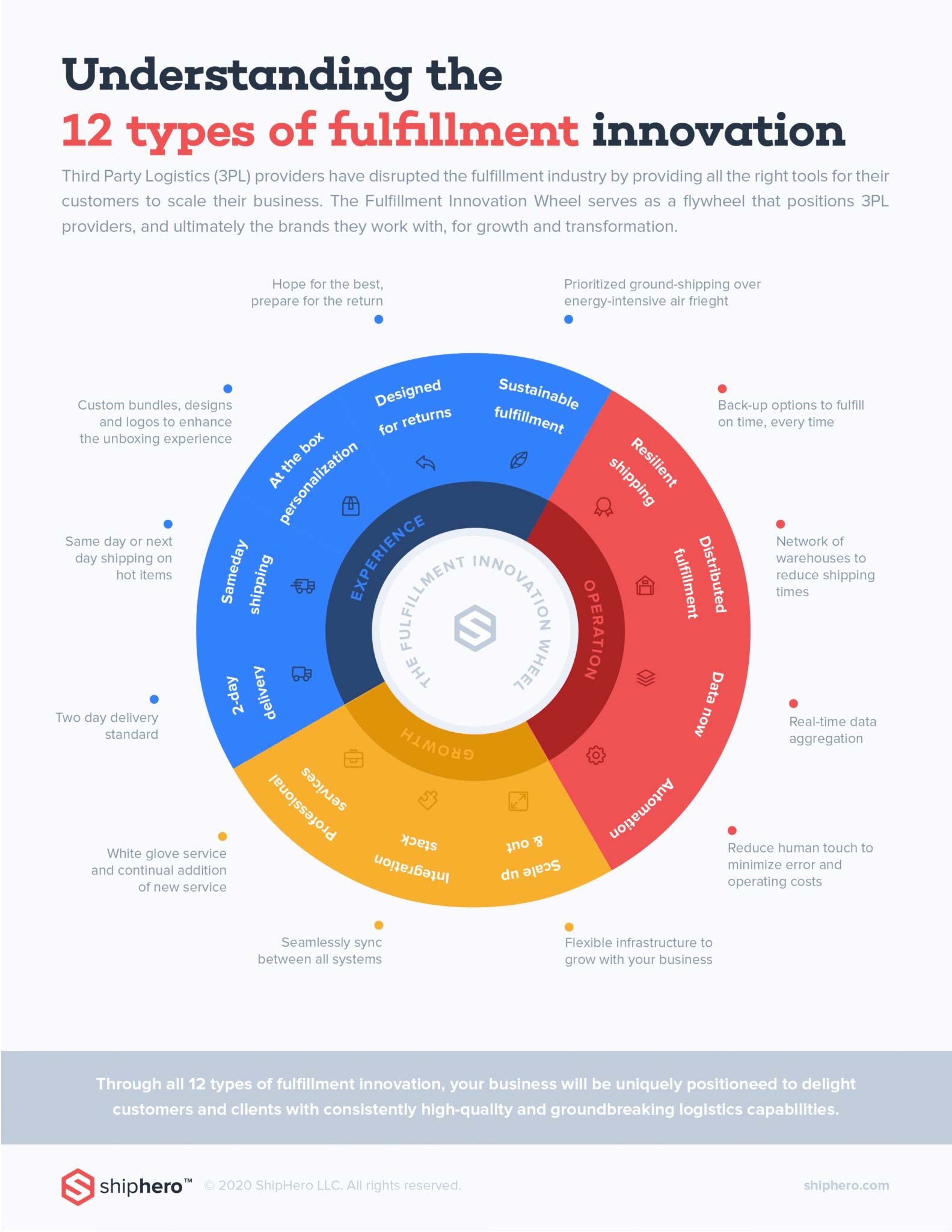
ShipHero recently launched The Fulfillment Innovation Wheel to help 3PLs understand what capabilities and service offerings they need to implement in order to be successful and to help online retailers and brands choose which 3PL is right for them by allowing them to ‘check the boxes’.The Fulfillment Innovation Wheel listed a set of twelve (12) capabilities that fulfillment providers and logistics companies should implement to continually delight their customers and push themselves towards greater success and innovation.The twelve capabilities are:
In this article, we will be diving into Capability #6: Resilient Shipping. And be sure to stay tuned for future articles as we deep-dive into each capability.
Is your business sufficiently protected from supply chain risks like extreme weather events, supplier disruptions, and well... pandemics? COVID-19 has certainly had an immense impact on global trade and domestic supply chains, but this hasn’t been an isolated incident, with SARS, measles, swine flu, ebola and avian flu all resulting in similar yet less severe business interruptions at a global level. Moreover, domestic supply chains are frequently plagued by extreme weather events, supply shortages, and carrier delays.Supply chain resilience refers to a company’s ability to conduct normal business operations despite sudden disruptions or unexpected events that negatively affect supply chains and order fulfillment. Resilient supply chains are also able to quickly recover from outages and achieve pre-disruption levels of functionality. As an example, many FBA merchants use ShipHero for FBM to avoid stock outs, maintain emergency inventory stockpiles, and provide diversified fulfillment options. In this article, let’s uncover how businesses can build a resilient supply chain and delivery network.
To start building your roadmap towards supply chain resiliency, you need to know what a resilient supply chain looks like. According to a recent study, these are the five core principles of a resilient supply chain:
Are these five principles present when looking at your own supply chain? If you outsource your fulfillment, ensure that your fulfillment provider can guarantee a resilient supply chain with the above principles.If your business fulfills in-house or you are a 3PL provider, consider building in the following practices for a resilient supply chain.
Hope for the best, plan for the worst. Your business can minimize damage from supply chain risks with the following best practices:
By documenting your end-to-end fulfillment process, you have a powerful visual tool to understand your supply chain and identify any possible pain points. Consider creating a process diagram and list relevant people at each step.As for data, how does information flow through your supply chain? Is it automated? Or does it heavily rely on the copy/pasting of a single employee? By creating a full picture of how data flows through your supply chain, you can identify possible bottlenecks or dependencies that could inflict serious damage to your supply chain in times of crisis. Consider creating a process diagram of how data moves around your business (i.e., data flow diagram) and list relevant people at each step.
Is your inventory where it should be at any given moment? Proper inventory management helps you avoid surplus inventory gathering dust on warehouse shelves and accumulating storage fees, while guarding against stock-outs and shortages in certain regions. Not to mention, intelligently distributed inventory allows you to reduce shipping costs and decrease delivery times. Consider investing in modern inventory management software to get oversight and control of your inventory, or switch to a fulfillment provider, like ShipHero, that uses advanced warehouse management software across their network of fulfillment centers.
In times of crisis, stressful or crunch-time decision making is very susceptible to human error. Automation can eliminate human interference in your core business processes, while leaving room for intervention when needed. Consider implementing automation rules in your inventory management software; for example, automation rules can help place orders with the most cost-efficient suppliers when inventory hits certain levels, or automation can be used to choose the optimal delivery carrier when many face delays.
Do you have the ability to access and share supply chain information in real-time? Being able to access up-to-date information and reporting enables better decision-making and emergency planning. Consider implementing procedures and systems to get the right data to the right decision makers.
Product returns introduce a lot of complications in your supply chain, including unpredictable inventory levels, increased costs, and reduced conversions -- and this is amplified during situations of surging demand or delayed shipments. With a more effective return strategy (i.e., reverse logistics), your business will be more prepared for when the ship hits the fan. Consider designing your supply chain and inventory management process with returns built in, or switching to a fulfillment provider that offers return credit and advanced reverse logistics capabilities.
With the above best practices in place, your data-driven supply chain will be optimized for resiliency, and be able to quickly detect, respond to, and recover from any sudden supply chain disruptions.Our customers love that ShipHero provides a resilient and data-driven supply chain that can offer 2-day shipping anywhere in the contiguous United States at simple and transparent pricing. We also prioritize ground shipping, making for an eco-friendly supply chain. We attribute this success on the Fulfillment Innovation Wheel to Capability #6: Resilient Shipping.Stay tuned next as we cover Capability #1: 2-day Delivery! Get 2-day, today. ShipHero.
Learn more about ShipHero's industry-leading warehouse management software.
.webp)

The ShipHero Model Context Protocol (MCP) connects supported AI clients directly to your live ShipHero data, so warehouse teams can ask questions and get specific answers from their own account. It is built for day-to-day operational checks, including inventory levels, open orders, shipment status, holds, returns, purchase orders, and exceptions. For ShipHero customers, it is available at no additional charge and runs on existing API credits.
Every order, shipment, inventory movement, hold, return, and purchase order creates data inside ShipHero. Your warehouse information is right there, but getting to it can be a slow, complex process.
Before the ShipHero MCP, answering a specific operational question often meant logging in, finding the right report, applying the right filters, exporting data, or asking the one person on the team who knew where to look.
Even when the answer was simple, like a quick inventory check, it could turn into a 20 to 45 minute task. A customer question could sit half a day while someone pulled the right numbers. That delay adds friction to the floor. It slows decisions. It keeps teams waiting on data they already own.
The ShipHero MCP gives supported AI clients secure, read-only access to live ShipHero data.
That means operators can ask questions in plain English and get answers from their actual account, not from a generic help article or static knowledge base. A chatbot can tell you where to find a number. The ShipHero MCP can return the number itself.
It works with MCP-enabled AI clients, including Claude, ChatGPT, Cursor, and Codex. Connect it once, authenticate access, and your team can start asking operational questions from the AI tool they already use.
The workflow is simple:
The MCP does not replace ShipHero. It makes the data inside ShipHero easier to reach when your team needs a fast answer.
The ShipHero MCP is designed for everyday operational questions, such as:
If the data lives in your ShipHero account, the MCP gives your team a faster way to ask for it.
Speed matters, but safety matters too.
The ShipHero MCP is read-only by design. It can retrieve information from your account, but it cannot create orders, modify records, delete data, or change warehouse settings.
That gives teams a practical way to use AI for operational visibility without risking accidental account changes. Operators can ask. Managers can check. 3PL teams can answer client questions faster.
The data becomes easier to use, while the records stay protected.
For founders, the MCP can turn a quick inventory check into a simple question.
For operations leads, it can surface shipment status, holds, exceptions, and low-stock SKUs without digging through reports.
For 3PL operators, it can help answer client questions faster, using live account data instead of manual follow-up.
The result is a faster way to reach the information already inside ShipHero.
The ShipHero MCP is available to all ShipHero customers at no additional charge. It runs on existing API credits, so specific questions help keep usage efficient.
To get started, visit developer.shiphero.com or contact your ShipHero account representative.
ShipHero MCP is a read-only connection between supported AI clients and your live ShipHero data. It lets users ask operational questions in plain English and receive answers from their actual ShipHero account.
A chatbot usually answers from fixed, generic information. ShipHero MCP connects to live account data, so it can return specific answers about your orders, shipments, inventory, holds, returns, and other ShipHero records.
ShipHero MCP works with AI clients that support the Model Context Protocol, including Claude, ChatGPT, Cursor, and Codex.
No. ShipHero MCP is read-only. It can query data, but it cannot create, update, or delete records in your ShipHero account.
No. The MCP is built for operators and can be connected from a supported AI client in minutes. Developers may use more advanced tools for deeper analysis, but most day-to-day users can work directly with the MCP.
Yes. ShipHero MCP is available to ShipHero customers at no additional charge and runs on existing API credits.
.svg)

Transitioning to a new Warehouse Management System (WMS) is a high-stakes decision that often triggers concerns regarding downtime, data integrity, and workforce adaptation. As warehouses prepare for 2026 growth, understanding these common hurdles—and the technical solutions that resolve them—is essential for a successful migration. This guide addresses the five primary barriers to adoption and how a high-velocity infrastructure ensures a seamless transition.
Warehouse operators frequently hesitate to upgrade due to perceived risks that can halt operations. These challenges typically include:
To clear these hurdles, a structured implementation strategy is used to prioritize data density and entity clarity.
In the competitive eCommerce landscape, staying stagnant with manual workarounds is often more costly than the transition itself. Moving to a high-velocity WMS converts your warehouse from a cost center into a growth engine by providing Labor Efficiency and ROI through automated routing and reduced authentication friction.
Because the platform is built for the floor worker, features like Workforce Hero allow seasonal temps and new staff to be authenticated and productive in under an hour.
No. High-velocity infrastructure increases visibility by providing Total Real-Time Control. Managers can monitor exactly what is in the Hospital queue and track replenishment in real-time from a single dashboard.
Before going live, a ground-up audit is performed using cycle counting tools. The system's architecture ensures that every movement on the floor is synchronized with sales channels instantly, maintaining 99.9% accuracy.
.png)
Picture a packer at Peak Season. A box is in front of them, a product in each hand, and somewhere on a cluttered desk there's a mouse they need to find to confirm the order. They look down. They hunt. They click. Then they do it again. Thousands of times a day.
That moment of friction is small. But it is never just one moment. Multiply it across your entire pack line, across an entire shift, and you are looking at a measurable and largely invisible drag on your total throughput.
Tap-to-Pack is a purpose-built hardware controller designed by ShipHero to eliminate digital friction at the packing station. It connects via USB-C, requires no drivers or additional software, and syncs automatically with the ShipHero WMS packing app. This new system is now available at the ShipHero Store.
Instead of navigating a screen with a keyboard and mouse, packers execute every high-frequency command — such as selecting box sizes, printing labels, finalizing orders, flagging exceptions — with a single physical tap on one of eight programmable buttons.
Key specifications:
Most warehouses are running 2026 operations on 1990s peripheral standards. The keyboard and mouse were designed for spreadsheets and emails, not high-volume fulfillment. When used at a packing station, they create three compounding problems:
The problem is not your people. It is the tools you are asking them to use.
Tap-to-Pack introduces a "Rodent-Free" packing standard: a workflow where the packer's hands stay on the product, their eyes stay on the work, and the software fades into the background.
The device guides the packer through two feedback systems:
ShipHero customers running Tap-to-Pack are already seeing a 90% reduction in on-screen interactions and a significant increase in the number of orders packed per hour, without adding headcount or changing their warehouse layout.
One of the hardest challenges in fulfillment is absorbing volume quickly, especially during Peak Season, when temporary staff need to reach target productivity fast.
Because Tap-to-Pack's interface is physical and intuitive, there is almost nothing to teach. Pick up the product, follow the light, tap the button. New packers can reach target productivity in minutes rather than hours.
The system is also modular:
Whether you are a growing DTC brand or a high-volume 3PL, Tap-to-Pack is designed so your hardware never becomes a ceiling on what your team can do.
Tap-to-Pack is a programmable, industrial-grade hardware controller that connects to the ShipHero WMS and allows warehouse packers to execute packing station commands, such as printing labels, selecting boxes, and completing orders. All with a single physical button press, eliminating the need for a keyboard and mouse.
The device connects via USB-C and syncs automatically with the ShipHero WMS packing app. It is a true plug-and-play solution: no drivers, no background software, and no manual configuration required.
Yes. Buttons are configurable for a range of packing actions, including Print Label, Complete Order, Select Box Size, and the Hospital function, which flags a problematic order and keeps the line moving without stopping to resolve it on screen.
The system is fully modular. Connect up to two additional 8-button hubs to the Main Hub for a total of 24 programmable buttons, supporting even the most complex multi-step packing workflows.
Tap-to-Pack devices require ShipHero Packing App v1.0 or higher. The current release is v1.1.0.



.svg)