Shiphero Blog

The Fulfillment Innovation Wheel: Automation

In this article
This is some text inside of a div block.

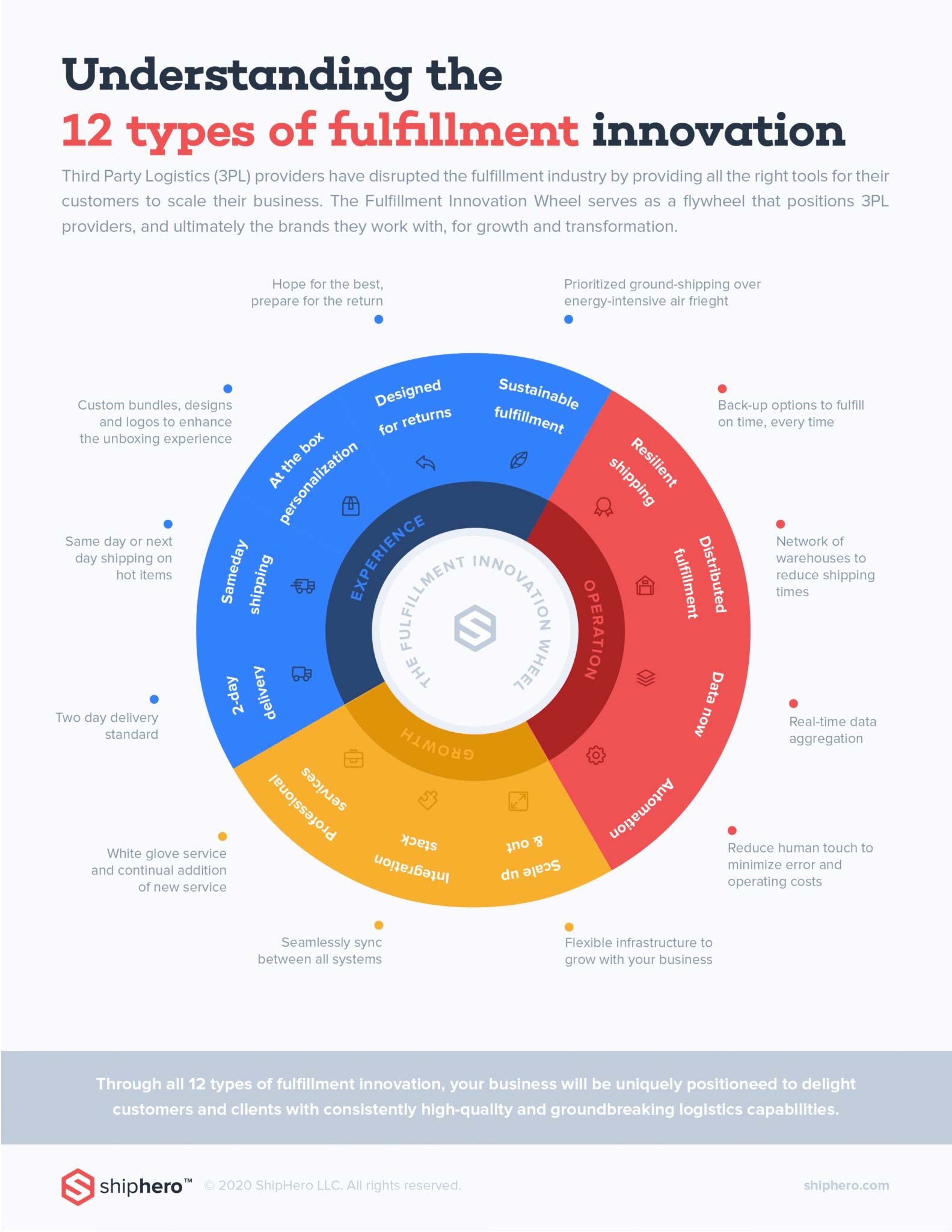
ShipHero recently launched The Fulfillment Innovation Wheel to help 3PLs understand what capabilities and service offerings they need to implement in order to be successful and to help online retailers and brands choose which 3PL is right for them by allowing them to ‘check the boxes’.The Fulfillment Innovation Wheel listed a set of twelve (12) capabilities that fulfillment providers and logistics companies should implement to continually delight their customers and push themselves towards greater success and innovation.The twelve capabilities are:

  1. 2-Day Delivery
  2. Same Day Shipping
  3. At the Box Personalization
  4. Designed for Returns
  5. Sustainable Fulfillment
  6. Resilient Shipping
  7. Distributed Fulfillment
  8. Data Now
  9. Automation
  10. Scale Up and Out
  11. Integration Stack
  12. Professional Services

In this article, we will be diving into Capability #9: Automation. And be sure to stay tuned for future articles as we deep-dive into each capability.

Capability #9: Automation

The mundane, the menial, the humdrum, the everyday monotony… these are the types of business activities that should and could be automated. Why spend your valuable time copy and pasting shipping information across your systems? Or manually inputting return information? Or constantly checking inventory levels? Let automation work for you!As a business owner, your fulfillment provider should also understand that your time is your most valuable resource. If you are just starting out, you may be able to manually handle it all on your own. But when your business grows bigger and bigger, and the orders are rolling in, you risk spreading yourself too thin, giving yourself no time to get your head above water and focus on your business’s long-term strategy. If you get to the point where the everyday tasks of your fulfillment process seems to be your only focus, it’s definitely the right time to switch to a fulfillment provider that can automate these for you.

ShipHero’s Automation Cookbook

For that reason, ShipHero has partnered with Alloy to unlock smart automations that improve inventory control and warehouse operations with just a few clicks, while integrating ShipHero with 60+ apps to improve the fulfillment experience and grow your business. The few example recipes below from ShipHero’s automation cookbook give you a glimpse at the power of automation between workflows, and may enlighten you to possibilities you never thought possible. Recipe: Send reorder emails or Slack notifications to staff for low inventory in ShipHeroOur workflow automates reorder emails to be sent to staff when there is low inventory in ShipHero. This ensures that your team can restock inventory at a reasonable pace and without over-stocking, and is a great way to organize the flow of customer traffic and inventory.Recipe: Tag Shopify orders based on ShipHero delivery dateThis workflow tags Shopify orders based on the ShipHero delivery date. This means that all orders are tagged by date allowing you to view which days are busy and how many orders are expected to ship out weekly. Tagging orders is a good way to stay organized especially when your store is expanding globally and there are multiple orders placed on the same day.Recipe: Set a ShipHero threshold to notify store owner of low inventoryThis workflow notifies you when your inventory is low in ShipHero. For instance, inventory levels are updated regularly and you receive inventory levels for each inventory item. When stock is low, you receive a notification. Immediate notifications to store owners are key to restocking your inventory and satisfying your eager customers. These notifications can be sent through Slack and email.Recipe: If an order is still unfulfilled in ShipHero after 2 days, email meThis automation will schedule a workflow after 2 days. Then, it will check to see if the order is unfulfilled for greater than or equal to 2 days. This will trigger an email notification to the store owner. This frees you up from constantly checking the fulfillment status of your orders.Recipe: Automate fulfillment for Gorgias returns requests in ShipHeroThis workflow automates fulfillment for Gorgias return requests in ShipHero. When a customer requests a return on Shippo, a Gorgias request is immediately created and sent. This frees up time from going back and forth between Shippo and Gorgias and ensures no information is lost.Recipe: Cancel ShipHero scheduled delivery if there is a Gorgias requestWith this automation, customers can send in a support ticket for a cancellation request. Once your team marks it as a canceled order, an email is sent to the ShipHero fulfillment team so they won’t fulfill the order.Recipe: Send ShipHero delivery updates via Klaviyo SMSSMS messages can have open rates as high as 98% and you’re not limited to using them for promotional campaigns. With this workflow, you can send delivery updates to customers through a text message to leverage higher open and engagement rates.In addition to the above, Alloy also has delivery update automations for Omnisend SMS, PostScript, SMSBump, and Tone, and more integrations are created all the time.Our customers love the automation capabilities that ShipHero provides. We attribute this success on the Fulfillment Innovation Wheel to Capability #10: Automation.Stay tuned next as we cover Capability #6: Resilient Shipping! Viva la resilience. ShipHero.
Learn more about ShipHero's industry-leading warehouse management software.

the process

Explore more of our features

No items found.
Shiphero logo on a grey background
September 9, 2025

How AI is Transforming Warehouse Management: Impact, Benefits, and Use Cases

Imagine running a warehouse where orders are picked quickly, inventory is accurate, and all operations run smoothly without any errors or delays. Thanks to Artificial Intelligence, this can now become a reality with ease.

AI is transforming warehouse management by enhancing efficiency, intelligence, and the ability to meet the rapid demands of today’s eCommerce-driven market.

ShipHero is pioneering this revolution with its AI-powered warehouse solutions, setting new industry benchmarks. This article explores ShipHero’s AI Picking feature, highlighting how it’s transforming warehouse management and enhancing operational efficiency.

Benefits of AI in Warehouse Management

The integration of AI technologies, including machine learning, robotics, and predictive analytics, is revolutionizing warehouse operations, driving significant improvements in efficiency, accuracy, and overall performance. These innovations are optimizing processes across various areas, from inventory management to order fulfillment. Below are the key benefits of AI in warehouse management.

  • Improves efficiency: By automating routine tasks, AI speeds up warehouse operations and streamlines workflows.
  • Reduces operational costs: With AI automating repetitive tasks, businesses can save on labor costs and minimize errors.
  • Enhances inventory management: AI ensures that inventory is always accurate, with real-time updates and better control over stock levels.
  • Predicts demand: AI accurately predicts demand, enabling businesses to manage inventory effectively and avoid stockouts or excess stock.

Key Components of AI-Driven Warehouse Systems

A combination of AI technologies is shaping smarter warehouse systems to help revolutionize warehouse management.

  • Inventory Management Systems – AI-powered inventory management systems ensure that stock levels are continuously updated and accurately tracked to improve operational efficiency and minimize errors in inventory counts.
  • Automated Guided Vehicles (AGVs) – Automated vehicles (AGVs) optimize routing by quickly transporting goods, speeding up processing times, and improving throughput.
  • Robotic Process Automation (RPA) – RPA automates repetitive tasks like picking, sorting, and shipping to allow 24/7 warehouse operations with minimal human intervention.
  • Predictive Analytics and Demand Forecasting – AI tools predict demand accurately, ensuring optimal inventory levels and reducing stockouts or overstocking.

ShipHero’s AI Picking: A Game Changer in Warehouse Efficiency

ShipHero has taken AI integration to the next level with its AI Picking feature, designed to significantly improve warehouse efficiency. This feature automates the picking process, reducing the reliance on manual labor and enhancing productivity in ways that were once thought impossible.

Let’s dive deeper into how ShipHero’s AI Picking works and the advantages it offers.

How AI Picking Works

AI Picking optimizes warehouse operations in two key ways:

  • AI Path Optimization: By calculating the most efficient routes, walking time is reduced by up to 30%, allowing pickers to spend more time fulfilling orders.
  • Smart Batching: Orders are intelligently grouped to maximize pick density, minimizing trips while speeding up processing times.

Benefits of AI Picking

The AI Picking feature delivers a wide range of benefits:

    Increased Productivity: With optimized paths and smart batching, pickers can fulfill more orders in less time, dramatically increasing throughput.Lower Labor Costs: AI Picking reduces the need for human labor, cutting operational costs.Improved Warehouse Efficiency: Path optimization and smart batching maximize space and resources, streamlining operations.

Broader Impacts of AI in Warehouse Management

The transformative power of AI extends far beyond just picking. AI is also revolutionizing other aspects of warehouse management, driving improvements in operational efficiency, inventory management, and safety.

Operational Efficiency

AI automates tasks, reducing errors and increasing speed. Automated sorting and real-time inventory tracking ensure accuracy, while real-time monitoring helps managers adapt and ensure timely deliveries.

Inventory Management

AI plays a vital role in maintaining accurate inventory levels. By leveraging predictive analytics, AI can forecast demand and optimize stock levels, helping warehouses avoid both stockouts and overstock situations. This leads to better inventory management and fewer disruptions in supply chains.

Safety and Compliance

AI-driven systems can monitor warehouse conditions to ensure safety and compliance with industry regulations. These systems can analyze warehouse data and predict potential hazards before they occur, proactively reducing risks and ensuring a safer working environment.

Applications of AI in Supply Chain and Logistics

AI technologies are playing a transformative role in the supply chain and logistics sectors by improving efficiency, reducing costs, and enhancing decision-making.

These intelligent systems effortlessly manage supply chain processes by using data to optimize operations, predict trends, and automate routine tasks. This ultimately reshapes everything, from how goods are moved to stored and delivered.

  • Inventory Optimization: AI analyzes sales data, trends, and external factors to optimize stock levels. This reduces stockouts, overstocking, and excess inventory, ensuring more accurate and cost-effective inventory management.
  • Demand Forecasting: AI helps predict future demand by analyzing historical data and market conditions. This allows businesses to plan inventory, production, and procurement more efficiently, reducing waste and ensuring product availability.
  • Route Planning and Optimization: AI also optimizes delivery routes by considering real-time factors, including traffic and weather conditions. This helps businesses reduce fuel costs, improve delivery times, and enhance overall logistics efficiency.
  • Warehouse Automation: AI-powered robots can automate picking, sorting, and packing in warehouses. This increases accuracy, reduces labor costs, and enhances order fulfillment speed, eventually improving overall warehouse efficiency.

The Future of AI in Warehouse Management

The future of warehouse management looks promising with greater automation and efficiency, but future warehouse digitization brings challenges, such as high upfront costs and the need for skilled personnel.

Emerging Trends and Innovations

AI-powered drones, autonomous robots, and IoT integration are smart warehouse technologies that are revolutionizing warehouse operations. Drones will deliver goods quickly, while robots automate sorting and transportation, thereby reducing the need for manual labor.

IoT and AI integration will enable real-time monitoring and optimization of operations. Smart technology in warehouses is leading to fully automated systems that are faster, scalable, and need minimal human input.

Challenges and Considerations

While AI offers immense benefits, businesses must also consider certain challenges. High initial investments in AI technology, data security concerns, and the need for skilled personnel are just a few of the hurdles that must be addressed.

However, with a strategic approach, companies can eliminate the challenges and embrace AI’s full potential to boost accuracy in picking and improve overall warehouse operations.

Key Takeaways

  • AI is transforming warehouse management by making operations faster, more accurate, and cost-effective.
  • ShipHero’s AI Picking system demonstrates how AI can help warehouses handle more orders, cut down on labor costs, and streamline their processes.
  • AI improves routing, aids decision-making, and ensures timely stock replenishment, helping businesses stay competitive in eCommerce.

Frequently Asked Questions

How can AI help in reducing warehouse errors?

AI minimizes error by automating tasks like inventory tracking, order picking, and sorting, ensuring greater accuracy and efficiency.

Can AI be used for predictive analytics in warehouse management?

Yes, AI-driven predictive analytics can predict demand, track inventory levels, and improve supply chain efficiency by forecasting needs with greater accuracy to help businesses stay ahead of trends and market fluctuations.

Is AI in warehouse management affordable for small businesses?

AI solutions are becoming more cost-effective thanks to cloud-based services and subscription pricing models. These options make AI technology more accessible to small businesses, allowing them to take advantage of its benefits without large upfront costs.

Read more
Arrow icon
Shiphero logo on a grey background
September 9, 2025

Warehouse Receiving Process Checklist: Definition and Template

When pallets roll in and loading docks buzz, your warehouse’s receiving process becomes the gatekeeper of inventory accuracy. And if that gate isn’t well-guarded with structure, speed, and oversight, errors slip in.

A mislabeled item here, a damaged shipment there, and suddenly your warehouse faces stock discrepancies, late order fulfillment, or even lost customers.

A warehouse receiving process checklist streamlines receiving operations and ensures compliance across teams, regardless of who’s on shift.

What is a Warehouse Receiving Process Checklist?

A warehouse receiving process checklist ensures every shipment that enters your facility is properly documented, inspected, and integrated into your inventory system.

Unlike ad hoc or verbal processes, this structured document verifies product condition upon arrival, checks against purchase orders to confirm accuracy, and documents all inspections for future reference.

However, ShipHero’s digital platform already seamlessly integrates this checklist into your system, automating the tracking of goods from the moment they arrive.

Because it captures critical shipment details, a receiving checklist can double as a warehouse audit checklist sample, especially when preparing for performance reviews or inventory audits.

If you’re looking for ways to improve accuracy and accountability, learning how to audit your warehouse with a structured receiving checklist is a great place to start.

What to Include on a Warehouse Receiving Process Checklist

Receiving Checklist Sample 1          


Receiving Checklist Sample 2

A well-structured warehouse receiving process checklist is crucial for ensuring accurate and efficient inventory management. Including the mentioned key components helps streamline the process, reduces errors, and enhances overall warehouse performance.

Here’s what you must include in your checklist to maintain control and accountability:

Purchase Order Number

This anchors the entire inspection. By referencing the purchase order (PO) number, warehouse teams can verify the received goods against the original order, ensuring the correct items and quantities are delivered.

Supplier Name & Address

Having the supplier’s full details improves accountability. If there’s a delivery issue, this info helps your team evaluate supplier performance and speed up resolution.

Date & Time of Delivery

Timestamping each delivery helps you review delivery schedules, track shipment delays, and identify potential gaps in receiving coverage.

Receiving Inspection

Here, staff will assess damage or discrepancies, confirm specifications (e.g., size, color), take photos if needed, and record all inspections in case of claims or audits. An effective inventory audit checklist incorporates these inspection protocols to ensure accuracy from the moment goods arrive.

Material Name

Listing the material name (e.g., product name, SKU, or description) prevents mix-ups during inventory allocation and ensures all items are accounted for. This also helps your Warehouse Management System (WMS) update stock records correctly.

Information Like “Delivered By” and “Received By”

Identifying who delivered and who received the shipment establishes accountability, helps resolve disputes over damaged or missing items, and ensures proper handoff records.

Documentation

Maintaining proper documentation, such as packing slips, invoices, and bills of lading, facilitates order reconciliation and supports formal audits and record keeping.

Why is a Warehouse Receiving Process Checklist Important?

A single receiving error often ripples through the entire warehouse. A structured receiving checklist breaks this cycle by establishing clear protocols that coordinate with supply chain operations and create accountability at every step. It drives big improvements in:

  • Faster receiving times: Teams know exactly what to do, in what order, and what to record.
  • Error reduction: Prevents items from being missed, mislabeled, or stored incorrectly.
  • Better supplier relationships: Helps track trends in late shipments, missing items, or recurring damage.
  • Improved stock accuracy: A clear receiving trail makes it easier to spot when something goes wrong.

This plays out in real operations. A mid-sized clothing retailer had ongoing issues with stock discrepancies during receipt. However, implementing a standardized receiving checklist significantly reduced the number of missing items and stock inaccuracies.

Employees also appreciated having clear instructions to follow, which reduced confusion and helped maintain a smoother workflow during peak delivery periods.

How to Create a Warehouse Receiving Process Checklist

Before drafting your checklist, take a closer look at your existing receiving workflow. Next, identify any inefficiencies and pinpoint areas that could benefit from more structure and consistency.

Decide on Information to Include in the Checklist

Choose the data points you’ll need based on your warehouse flow, system integration, and team size. Include only what’s necessary to document key handoff moments.

Choose a Proper Checklist Format

You can go with paper, but digital formats (via tablets or mobile apps) are easier to scale. Software-based checklists can instantly update records and integrate with your WMS.

Create the Checklist Using a Software Template

Use inventory management platforms or cloud-based tools to build your checklist. For example, ShipHero’s template system allows you to configure fields, set mandatory requirements, and establish workflow rules that guide staff through the receiving process. This makes sure every receiving action is consistent and auditable.

Train Employees

Train staff to make sure every team member follows standardized procedures. This minimizes human error, especially for new or seasonal workers.

Implement the Checklist

Roll out the checklist during a test period. Assign clear roles (e.g., receiver, inspector), gather feedback, and then launch warehouse-wide. Revisit and refine it quarterly to keep up with operational changes.

Warehouse Receiving Best Practices

Your warehouse receiving checklist works even better when paired with these best practices:

Building a Proper Receiving Schedule

Spacing out deliveries helps reduce bottlenecks and allows teams sufficient time to track inventory levels accurately. It also allows for more accurate inspections.

Optimizing the Warehouse Space

Keep receiving areas clutter-free and near the entrance. This shortens the time it takes to organize storage locations after goods are received.

Upgrading Warehouse Receiving Equipment

Invest in equipment such as barcode scanners, conveyors, or forklifts to speed up receiving operations, especially during peak seasons.

Separating Damaged Goods

Don’t let broken items enter inventory. Flag them, document the issue, and notify procurement so the issue can be escalated quickly.

Simplify Warehouse Receiving with ShipHero’s Automated Solutions

By leveraging real-time inventory tracking and barcode scanning, you can eliminate the need for manual checklists, ensuring that every received item is accurately logged. ShipHero automates the entire receiving workflow, reducing human errors and speeding up the process.

Customizable receiving workflows allow you to tailor the system to your warehouse’s specific needs, eliminating the need for paper-based checklists. Improve efficiency, accuracy, and consistency, all with ShipHero’s advanced automation tools.

Key Takeaways

  • A warehouse receiving checklist provides structured workflows that ensure accurate, efficient processing of incoming shipments
  • For operational transparency, checklists should include critical information, such as PO number, supplier information, inspection results, and timestamps.
  • For best results, use tools like ShipHero to digitize checklists, train your team properly, and regularly review performance.

Frequently Asked Questions

How Often Should You Update the Warehouse Receiving Procedures?

At least annually, or anytime your business introduces a new product line, supplier, or technology upgrades.

Is It Beneficial to Cross-Train Staff on Receiving Processes?

Absolutely. Cross-training builds flexibility, enabling teams to cover for absences and maintain efficiency even during peak periods or periods of high turnover.

What Should You Do If the Item Received Is Damaged?

  1. Document the damage with photos and notes.
  2. Isolate the damaged item to prevent it from entering inventory.
  3. Notify the supplier immediately with details and evidence.
  4. Update your stock count to reflect the issue.
  5. Follow supplier protocols for returns or replacements.

Read more
Arrow icon
Shiphero logo on a grey background
September 9, 2025

Warehouse Daily Checklist: Guide and Free Template

One missed check can cost you thousands of dollars. You may have a damaged pallet, a missing fire extinguisher, or a skipped safety step that can put your team at risk.

Warehouse daily checklists serve as a pilot’s pre-flight checklist. Before takeoff, every switch, lever, and system is checked. Why? Because skipping one step can lead to serious problems. The same goes for your warehouse.

Without a solid checklist, you risk delays, missed shipments, or worse, accidents and safety violations. A checklist ensures your team follows the right procedures and nothing falls through the cracks.

Here’s everything you need to include in a warehouse daily checklist, its definition, and templates you could use to get started fast.

What is a Warehouse Daily Checklist?

A warehouse daily checklist is a structured form that helps warehouse staff systematically inspect, verify, and record essential tasks on a daily basis. It covers all the daily to-dos that keep your warehouse operations running smoothly and safely, such as inventory tracking and forklift inspections.

The warehousing and storage industry reported an injury rate of 4.8 per 100 full-time workers, nearly double the national average of 2.7. Following a daily warehouse checklist ensures the right procedures and safety protocols are followed and nothing important gets missed.

Creating an Effective Warehouse Daily Checklist Template

A great warehouse daily checklist supports the safety of your warehouse, reduces errors, and keeps your workflow on point. Here’s how to make a checklist that your warehouse workers will actually use and benefit from.

Components of a Warehouse Daily Checklist

Every component of your checklist ensures your facility, staff, and inventory remain safe, compliant, and productive.

Common components include:

  1. Inventory Checks: Your team should do an inventory audit. Monitor current stock levels, confirm the accuracy of quantities, check the condition of stored items, and inspect the labeling and bin organization to prevent errors, shortages, or misplaced goods. Real-time inventory visibility and predictive restocking tools, such as ShipHero, make this process seamless. Make sure that the receiving process is airtight as well.
  2. Equipment Inspections: Your checklist should ensure that all tools, forklifts, devices, and fire extinguishers are operating safely and efficiently. Inspect the equipment for wear and damage, document the condition, and update the maintenance schedule when necessary.
  3. Safety Protocols: Safety and security checks minimize accidents. Inspect the visibility of signage and emergency exits, and oversee the handling of known hazards.
  4. Cleanliness & Housekeeping: A clean and organized warehouse is a safer and more efficient one. Monitor the cleaning of floors, the clearing of walkways, and the organization of storage zones to support optimal workflow and reduce risk.
  5. End-of-Day Tasks: To properly close operations, include tasks that secure the workplace and prepare for the next shift. Record the completion of final duties, document the status of unresolved issues, confirm system backup, and update the daily reports for supervisor review.

Instructions should be clear and structured to help your team move through inspections efficiently and consistently.

Step-by-Step Guide

Your daily warehouse checklist doesn’t have to be very detailed and complicated. It needs to be thorough, practical, and easy to follow.

Here’s how to build a great one:

  1. Identify Daily Tasks: List out everything that needs to happen each day. Walk through the warehouse and discuss routine procedures with your supervisors and warehouse staff to capture all relevant information.
  2. Assign Responsibilities: For each task, decide who’s in charge. Is it a shift supervisor, floor staff, or a designated inspector? Make responsibilities clear so no task is missed or assumed to be “someone else’s job.”
  3. Format It Clearly: Use a structured, easy-to-use layout with checkboxes, concise instructions, and well-defined sections, such as safety and cleanliness. Keep it readable because you want quick glances, not long paragraphs.
  4. Incorporate Timing & Schedules: Some tasks should be completed in the morning, others throughout the shift, and some before closing. Schedule them accordingly, and use timestamps if needed (e.g., “Check emergency exits before 10 AM”).
  5. Include a Sign-Off or Signature Field: Have the assigned employee or team member document their name and time completed. This builds accountability and provides a record for inspections, audits, or compliance tracking.
  6. Involve Your Team in the Design: Ask your warehouse workers what works and what doesn’t. They know the real flow better than anyone. Involving them boosts buy-in, reduces resistance, and ensures the checklist actually helps them.

When your checklist comprehensively details the tasks in a concise manner, it becomes a tool that delivers massive impact. This ensures your warehouse operations run smoothly, safely, and efficiently.

Free Warehouse Daily Checklist Template

Ready to skip the setup and just get started? Feel free to copy our Warehouse Daily Checklist Template to your Google Docs or Microsoft Word document. It’s accessible, user-friendly, and 100% customizable to your needs.

Section Task Completed Person in Charge Time Signature
Inventory Checks Verify current stock levels
Check the condition of stored items
Confirm the accuracy of item labels
Inspect the bin and shelf organization
Equipment Inspections Inspect forklifts (damage, fluid levels, battery charge)
Ensure tools are returned to proper storage
Test barcode scanners and mobile devices
Safety Protocols Check fire extinguishers (placement, charge, expiration date)
Ensure emergency exits are accessible and clearly marked
Confirm that safety signage is visible and undamaged
Inspect for any spills or hazards in work zones
Cleanliness & Housekeeping Sweep and clean floors
Clear walkways and aisles
Organize storage zones
Dispose of waste and recycling properly
End-of-Day Tasks Secure all warehouse entrances and exits
Backup system data
Document unresolved issues
Submit daily report to supervisor
Remarks:


Employee Name: Date:
Supervisor Signature:

Simply plug in your specific details, and you’re set. It’s built to save time, support compliance, and help you manage your daily workflow like a pro.

How ShipHero’s Warehouse Management System Improves Warehouse Efficiency

ShipHero’s Warehouse Management System (WMS) boosts warehouse efficiency by automating key processes like inventory tracking, order picking, and shipping. By streamlining these workflows, it reduces manual labor, minimizing errors and delays.

The system’s real-time data updates allow staff to make quick, informed decisions, improving overall productivity. Customizable features enable businesses to adapt ShipHero to their specific operational needs, further enhancing efficiency. With ShipHero, warehouses can achieve faster turnaround times, reduced costs, and improved accuracy.

Key Takeaways

  • A daily warehouse checklist boosts safety, reduces errors, and supports smooth warehouse operations.
  • Include sections for inventory, equipment, safety, cleaning, and end-of-day procedures.
  • Download our free, customizable template to save time and increase productivity from day one.

Frequently Asked Questions

How Often Should a Warehouse Daily Checklist Be Reviewed?

Review a warehouse daily checklist, weekly, or monthly to maintain accuracy and relevance. Frequent reviews help align the checklist with workflow changes, new safety protocols, or operational updates.

Can You Customize a Warehouse Daily Checklist Template?

Yes, you can customize a warehouse daily checklist template. Most templates are designed to be modified based on team size, warehouse layout, and operational goals. Customization improves relevance and usability across different warehouse environments.

Is Training Required to Use a Warehouse Daily Checklist?

Yes, basic instruction and simple training on how to use the checklist ensure employees understand how to follow the checklist, report issues, and meet safety or performance standards. Training improves consistency and accountability across shifts.

Read more
Arrow icon