.svg)

Retire the keyboard. Retire the mouse. ShipHero's Tap-to-Pack is a rugged, 8-button hardware controller that solves navigation at the packing station. Warehouses using it report a 90% reduction in on-screen interactions and a significant increase in orders packed per hour.
.png)
.svg)
Picture a packer at Peak Season. A box is in front of them, a product in each hand, and somewhere on a cluttered desk there's a mouse they need to find to confirm the order. They look down. They hunt. They click. Then they do it again. Thousands of times a day.
That moment of friction is small. But it is never just one moment. Multiply it across your entire pack line, across an entire shift, and you are looking at a measurable and largely invisible drag on your total throughput.
Tap-to-Pack is a purpose-built hardware controller designed by ShipHero to eliminate digital friction at the packing station. It connects via USB-C, requires no drivers or additional software, and syncs automatically with the ShipHero WMS packing app. This new system is now available at the ShipHero Store.
Instead of navigating a screen with a keyboard and mouse, packers execute every high-frequency command — such as selecting box sizes, printing labels, finalizing orders, flagging exceptions — with a single physical tap on one of eight programmable buttons.
Key specifications:
Most warehouses are running 2026 operations on 1990s peripheral standards. The keyboard and mouse were designed for spreadsheets and emails, not high-volume fulfillment. When used at a packing station, they create three compounding problems:
The problem is not your people. It is the tools you are asking them to use.
Tap-to-Pack introduces a "Rodent-Free" packing standard: a workflow where the packer's hands stay on the product, their eyes stay on the work, and the software fades into the background.
The device guides the packer through two feedback systems:
ShipHero customers running Tap-to-Pack are already seeing a 90% reduction in on-screen interactions and a significant increase in the number of orders packed per hour, without adding headcount or changing their warehouse layout.
One of the hardest challenges in fulfillment is absorbing volume quickly, especially during Peak Season, when temporary staff need to reach target productivity fast.
Because Tap-to-Pack's interface is physical and intuitive, there is almost nothing to teach. Pick up the product, follow the light, tap the button. New packers can reach target productivity in minutes rather than hours.
The system is also modular:
Whether you are a growing DTC brand or a high-volume 3PL, Tap-to-Pack is designed so your hardware never becomes a ceiling on what your team can do.
Tap-to-Pack is a programmable, industrial-grade hardware controller that connects to the ShipHero WMS and allows warehouse packers to execute packing station commands, such as printing labels, selecting boxes, and completing orders. All with a single physical button press, eliminating the need for a keyboard and mouse.
The device connects via USB-C and syncs automatically with the ShipHero WMS packing app. It is a true plug-and-play solution: no drivers, no background software, and no manual configuration required.
Yes. Buttons are configurable for a range of packing actions, including Print Label, Complete Order, Select Box Size, and the Hospital function, which flags a problematic order and keeps the line moving without stopping to resolve it on screen.
The system is fully modular. Connect up to two additional 8-button hubs to the Main Hub for a total of 24 programmable buttons, supporting even the most complex multi-step packing workflows.
Tap-to-Pack devices require ShipHero Packing App v1.0 or higher. The current release is v1.1.0.
.webp)
When preparing goods for shipment, the packing station is a crucial stage that requires careful attention to detail. Optimizing packing flow and station setup ensures accuracy and speed, thus reducing mistakes and improving the overall efficiency of your fulfillment operation. This article will discuss the importance of packing station setup and flow in successful order fulfillment.
We recommend following a few basic principles.
Watch one of our informative videos where our CEO, Aaron Rubin, shares valuable insights on setting up a successful packing station - right here! Some principles he discusses include minimizing touches, maintaining one-direction flow, and avoiding the use of keyboards and mice.
Determine the primary goal and select the appropriate tools and materials. If you're working at a shipping station, your tasks may include combining orders, performing final quality checks, packaging, addressing and labeling, generating a manifest, and staging.
You can develop a packing station tailored to your requirements by organizing and defining these tasks. Planning final checks to ensure the products are of the highest quality is essential. Identify the locations where the inspections will occur and devise a strategy to manage damaged or defective items.
To optimize your fulfillment process, pay close attention to the flow of your packing station. Ensure that the products are moving clearly and consistently throughout each stage of the packing process. One way is by implementing signs or arrows dictating the proper directions. Additionally, designing your packing station for a seamless transition between each step can lead to a more efficient work environment.
When setting up your workstation, consider how items will be received. Will they come in via a conveyor belt system, or will you need a manual or cart-based system? If you're using a conveyor belt, it's best to have a custom standalone workbench over it.
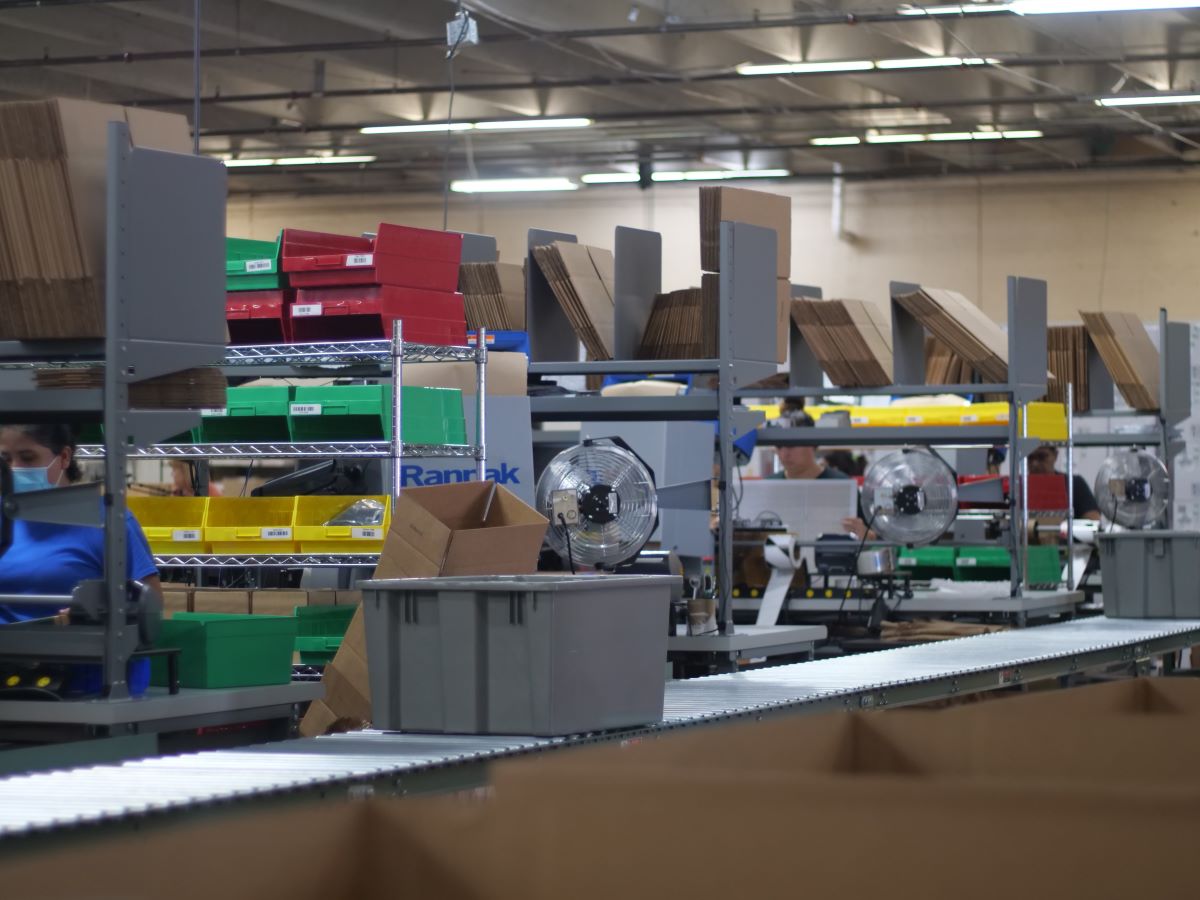
When setting up a packing station in your warehouse, there are two factors for you to begin with - proximity and materials. It's important to position the packing station close to the picking areas. This will allow for swift movement of items from picking to packing, minimizing delays.
When it comes to materials, prioritize the items used most often. Ensure your packing area has an adequate supply of commonly used items so your employees can keep the orders moving smoothly.
Having the appropriate equipment and tools to create a practical packing station is important. Some essential items to include are:
Once you have the appropriate tools and equipment, your packing station will be fully equipped to handle any shipment promptly.
When planning the layout of a packing station, it is crucial to consider ergonomics. Properly arranging goods and materials reduces the risk of work-related injuries, while worker morale and productivity can be increased.
The necessary tools and materials should be easily accessible to the packer and organized by the frequency and sequence of their use. Remember to include features such as optimal workstation height, sufficient lighting, and comfortable seating.
It's crucial to prioritize the replenishment process, which is often overlooked but can significantly impact operations. You can make the most of your replenishment process by following best practices and choosing the most suitable method for your specific needs.
Also, remember to have a solid emergency plan for replenishment needs. You can streamline this process by configuring triggers in your WMS for automatic re-ordering or using collaborative robots to assist with picking and restocking.
It's essential to maintain an organized and easily accessible stock of packing supplies and tools for your workers. Remember to replenish these items from behind the packing station to avoid hindering workflow in the front.

To guarantee accurate order fulfillment, utilizing technology that automates processes and integrates with warehouse management systems is essential. This can include automated sorting and routing of packages, which can help reduce errors and prevent bottlenecksWe strive to enhance the packing process with inventive solutions, including one-touch and hands-free pack stations. By minimizing the handling of items, we can optimize the process.
We provide adaptable pack stations that cater to different requirements.
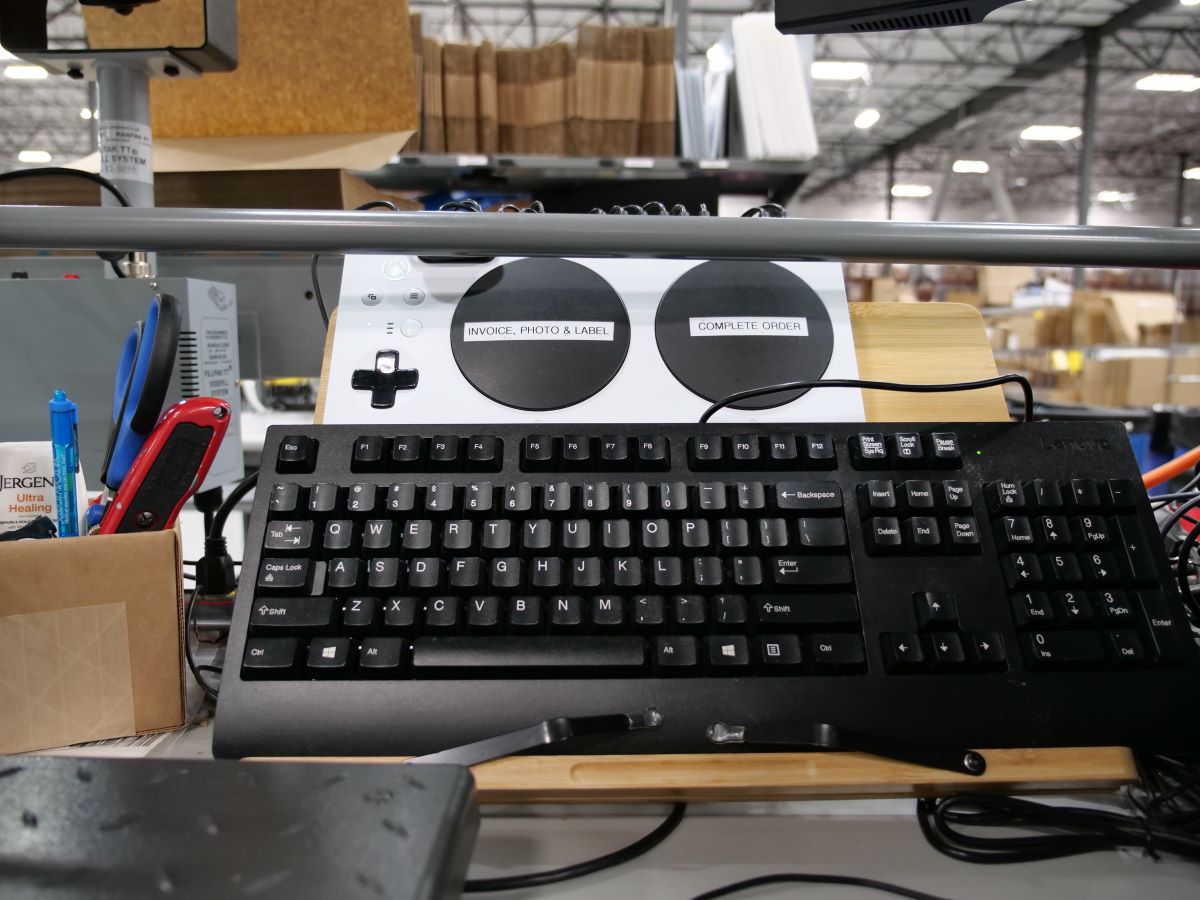
Handheld barcode scanners have undoubtedly changed the warehouse picking and packing game. However, there's no denying the lag between scanning barcodes and continuing work can be incredibly frustrating, adding unnecessary seconds to each order. To overcome this inefficiency, our team searched high and low for a non-wearable option that was both durable and cost-effective. Our solution came from an unlikely source: the gaming industry. With the Xbox® adaptive game controller, we found a way to streamline our packing stations without breaking the bank. When paired with the Logitech® button kit and some innovative open-source software, this controller has revolutionized how we pack orders.
As we have seen, the packing station is an important component of any order fulfillment process. It is essential to consider principles such as minimizing touches, maintaining one-direction flow, and avoiding keyboard or mouse use when designing a packing station setup. Furthermore, having the necessary equipment and tools available and being mindful of ergonomic design considerations facilitates accuracy. By integrating warehouse management systems with automation technologies, companies can ensure effective order fulfillment while minimizing errors. Ultimately, it's important to take stock of your current workflow and processes to identify opportunities for improvements that could give your organization an edge in the ever-evolving eCommerce landscape. Now it’s time to ask yourself: How does your packing station add up to the competition?

.svg)

By: Aaron Rubin, Founder & CEO of ShipHeroHow many seconds or minutes have you ever spent searching for a pen, a folder, a paperclip under piles of paper, on the floor, in the trash can (how did it get in the trash can)? And once you’ve found it, now you’re annoyed you lost it in the first place, and your zen-like state of productivity is long gone.Maybe this isn’t quite as common an occurrence as it once was, but there are always small things that get in the way of us working as efficiently as possible. A lost pen, 10 extra steps in the warehouse, an iPad with a dead battery … all of these take away from the time we could be working and kill our efficiency. This is the story of how one adaptive gaming controller revolutionized our packing station efficiency leveraging our Warehouse Management Software (WMS) along with our strong warehouse processes.
There is no doubt that handheld barcode scanners are a lifesaver, especially when talking about picking and packing in a warehouse. They reduce errors, allow for better quality assurance and save time. However, there is still always a bit of lag between picking up the scanner, scanning the barcode and then placing the scanner down to continue working. Especially when you’re in the critical packing phase of an order. Maybe it’s one or two seconds, but shave those few seconds off every order you pack, and you’ve accumulated a lot of time.This was the challenge for our ShipHero fulfillment centers where we also use our WMS; our packers who were unbelievably fast, wanted to be faster. They were looking for a non-wearable option. However, when the team investigated other options, like buttons for example they were either unreliable, inconsistent or far too expensive to make logical sense. So, maybe the handheld barcode scanner was as good as it gets.
ShipHero employee, Lucas Warner, was still frustrated by this issue. Knowing there had to be a solution to the button issue, he started to think about what type of device currently existed that was durable, adaptive and fairly easy to program. The answer lies in the gaming community. Xbox® released an adaptive game controller meant for gamers with limited mobility and less-than-fine motor skills. This type of device was exactly what could work for packing stations at ShipHero. When combined with a Logitech® button kit and some open source software, a solution was born.
Now with the touch of one or two buttons, packers can instruct ShipHero’s WMS to print the label/invoice and complete the order. The system uses different box sizes as the main differentiator. Once the box barcode is “scanned” - again at the touch of a button, instead of a handheld barcode scanner, ShipHero’s WMS knows what to do. In total, there are currently 17 buttons that can be programmed with different command codes. Two of them are taken by the first two functions mentioned above (print label/invoice, complete the order). The other 15 are up for grabs. The cost to make this upgrade is nominal - in fact, it’s cheaper than a socket mobile scanner, which is what most of our clients use in their warehouses. The only hiccup right now is that, like many electronics devices, adaptive controllers and button kits can be hard to come by. So, if you’re looking to outfit a dozen stations, you might need to do it in waves instead of all at once.
When any new process replaces an older one that seemingly still works, the question is always, “But why?” Why should you bother to make this change?Here are my top reasons:
I realize this last one might seem like a little who cares? But consider your current warehouse situation. Who are you looking to hire? Chances are you need new workers that may be a part of a generation already familiar with gaming and the satisfaction it brings. The gamification of shipping is not a passing fad - it’s more of a long-term solution. For example, ShipHero introduced the Hero Board - a running list of the top packers for the day - and it’s been a huge success. It helps to motivate the entire team to get more done and work more efficiently. Using an adaptive controller adds even more of a game-like feel to this friendly competition.There’s also no discounting the “coolness” factor.
People are always talking about innovation, AI and robotics in warehousing. And that stuff is coming - for some of you it’s part of your daily routine, and for others it’s still on your bucket list. But this type of innovation - a possible 3x upgrade in efficiency for a couple of hundred bucks, might reap bigger dividends in the short term than you could imagine. If you’re a current ShipHero WMS client, for steps on how to adapt your packer stations to game controller buttons, click HERE for the Knowledge Base article. If you’re new to ShipHero, schedule a meeting today with our software experts to learn more about our WMS built for ecommerce brands & 3PLs looking to run their best warehouse and how ShipHero works to ensure that organizations invest in the solutions that match their needs, to improve productivity, revenue, and success.Click HERE to Schedule a Meeting Today Aaron Rubin, Founder & CEOShipHeroAbout the author: Aaron Rubin is the Founder & CEO of ShipHero. He is responsible for planning and executing the overall vision and strategy of the organization. Rubin’s greatest strengths are leadership, change management, strategic planning and a passion for progression. He is known for having his finger on the pulse of ShipHero’s major initiatives, his entrepreneurial spirit, and keen business acumen. His leadership of ShipHero is grounded in providing excellent customer service that drives improved business operations. His passion for ShipHero comes from the culture and his ability to have an impact on the lives of employees, customers, partners, and investors.Follow Aaron on Twitter&LinkedIn.
If you've ever wondered how your online orders arrive at your doorstep quickly and efficiently, it's all thanks to the warehouse packing station. Packing stations are the places at the end of your shipment chain where orders are carefully packed and prepared. An effective packing station can reduce your labor costs, shipping expenses, and order errors and helps to meet your customer's satisfaction. It's a well-oiled machine that helps to ensure that your orders arrive on time and in perfect condition. In this blog, we go over the basics of a warehouse packing station and why they’re so important.
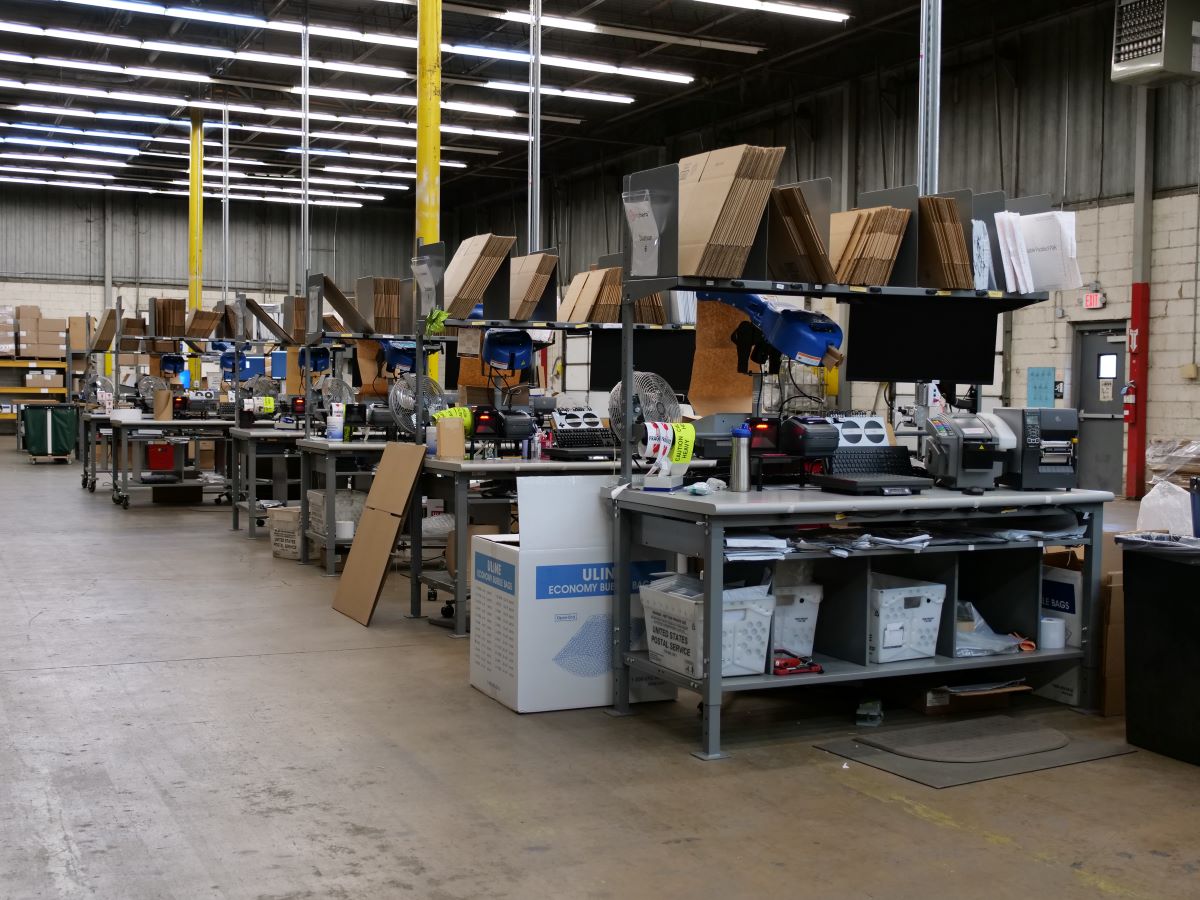
A packing station is a space in a warehouse where products are checked, packed, and labeled for shipping. In addition to being ergonomically efficient, it is equipped with all the packing materials necessary within easy reach. And a well-designed packing station can greatly improve the order fulfillment process.
Order fulfillment is only as fast as its slowest function, and packing–often the last stop before shipping–can be a bottleneck. But a well-designed warehouse packing station will ensure a place for everything. Modular and ergonomic packing stations can increase productivity by eliminating the need for workers to bend, reach, or leave the packing area to retrieve supplies.
Packing stations can be outfitted with various accessories. They usually consist of a workbench with shelves or gravity flow tracks designed to store the materials used to prepare orders for packing and shipping. Packing supplies such as boxes, envelopes, packing paper, and tape can be stored on packing stations in easy-to-reach locations. Tools like scanners, scissors, tape measures, utility knives, and tape guns are often organized and hung on the packing station for quick and easy access.
Connecting your packing and shipping areas with a simple gravity conveyor system can reduce bottlenecks and eliminate worker travel time. Thus creating a seamless integration between order picking, packaging, and the loading dock.
When it comes to efficiency, your packing station is key. But all too often, people focus solely on storage when designing their packing workstations. In order to maximize efficiency, your packing station needs to be integrated with the company's warehouse management system. As a result, you will be able to organize the most important packing materials and supplies logically. If you're looking to make your packing station even more efficient, you can do a few things.
A well-organized warehouse is very important for an efficient packing station. A perpetual inventory management system will keep track of stock levels and help avoid surprises. The workstation should be arranged so that all the tasks required to pack a shipment can be carried out smoothly and uninterrupted. It should also be tidy and well-stocked with all the supplies needed to safely and securely pack items for shipment. Creating a lean warehouse will save you time and money in the long run.
The packing process is one of the most important steps in getting products ready for shipping. A well-designed packing workflow can help improve efficiency and reduce errors. When creating a packing workflow, it is important to consider the type of products being packed, the volume of products, and the space available.
Packing stations that deal with high-volume small packages need to be more compact so that the worker has enough space to pack products quickly with all the packing materials within reach. Whereas packing stations that handle large and bulky products need to be spacious and include lifting equipment to help workers pack heavy items. Also, extra space can accommodate automation later on.
We have even gone one step further and included a YouTube video that walks you through the processes that go on at the packing station. You can watch the full video HERE
In a busy warehouse, time is of the essence. That's why it's important to have an efficient system for bringing orders to the packing workstation. Whether it's boxes, totes, skids, carts, or conveyors, the goal is to deliver the orders in batches, so the packer doesn't have to move from his workstation. The delivery system should be located next to the table, and the packer should always be within easy reach of a new order.
Whenever possible, staging systems should be next to the table so the packer can avoid lifting, carrying, and walking the carton to the staging location. The best solutions allow the packer to simply push the packed carton onto the staging area which helps to keep the packing station running smoothly and efficiently.
Remember those old handheld barcode scanners that revolutionized warehouse picking and packing? Well, there's always been a bit of a lag between picking up the scanner, scanning the barcode, and then placing the scanner down to continue working. Maybe it's one or two seconds, but shave those few seconds off every order, and you've accumulated a lot of time.
One of our ShipHeroes found our solution in the gaming community. Xbox® released an adaptive game controller meant for gamers with limited mobility. We discovered that this device could work for packing stations at ShipHero. The cost to make this upgrade is nominal. It’s cheaper than a mobile socket scanner, which most clients use in their warehouses. Not only that, but workers love it because it’s more fun and less time consuming. They literally push buttons, no time is lost scanning or using a mouse and keyboard.
If you're looking to keep your packing operation productive, it's important to frequently observe and upgrade the process as business factors change around it. You can be more accurate and faster with the right combination of processes, equipment, technology, and training. By frequently evaluating the packing process, you can ensure that your operation is always running smoothly.
An efficient warehouse packing station is critical to a successful order fulfillment process. That's because it helps you ship the right goods to your customers quickly and in good condition. It can reduce your labor costs, shipping expenses, and order errors and helps to meet your customer's satisfaction. After all, the success of any eCommerce business comes down to happy customers, and efficient packing stations are necessary to achieve this. Late orders, high shipping fees, and order inaccuracies won’t keep your customers coming back for more. Sometimes, you need a third party with a team of experts to handle the logistics while you focus on growing your business.
This is where a warehouse management solution like ShipHero can help you out. With ShipHero, you can automate your warehouse packing stations and get real-time insights into your fulfillment process so that you can make informed decisions about how to improve your operation. As a result, you can keep your customers happy and grow your business. Contact us today to learn more about how we can help you take your warehouse packing station to the next level!
—
Whether you want to let go of running your own warehouse or run your warehouse better, you can do both – and so much more – with ShipHero.
Click HERE to Schedule a Meeting with Our Sales Team.

The ShipHero Model Context Protocol (MCP) connects supported AI clients directly to your live ShipHero data, so warehouse teams can ask questions and get specific answers from their own account. It is built for day-to-day operational checks, including inventory levels, open orders, shipment status, holds, returns, purchase orders, and exceptions. For ShipHero customers, it is available at no additional charge and runs on existing API credits.
Every order, shipment, inventory movement, hold, return, and purchase order creates data inside ShipHero. Your warehouse information is right there, but getting to it can be a slow, complex process.
Before the ShipHero MCP, answering a specific operational question often meant logging in, finding the right report, applying the right filters, exporting data, or asking the one person on the team who knew where to look.
Even when the answer was simple, like a quick inventory check, it could turn into a 20 to 45 minute task. A customer question could sit half a day while someone pulled the right numbers. That delay adds friction to the floor. It slows decisions. It keeps teams waiting on data they already own.
The ShipHero MCP gives supported AI clients secure, read-only access to live ShipHero data.
That means operators can ask questions in plain English and get answers from their actual account, not from a generic help article or static knowledge base. A chatbot can tell you where to find a number. The ShipHero MCP can return the number itself.
It works with MCP-enabled AI clients, including Claude, ChatGPT, Cursor, and Codex. Connect it once, authenticate access, and your team can start asking operational questions from the AI tool they already use.
The workflow is simple:
The MCP does not replace ShipHero. It makes the data inside ShipHero easier to reach when your team needs a fast answer.
The ShipHero MCP is designed for everyday operational questions, such as:
If the data lives in your ShipHero account, the MCP gives your team a faster way to ask for it.
Speed matters, but safety matters too.
The ShipHero MCP is read-only by design. It can retrieve information from your account, but it cannot create orders, modify records, delete data, or change warehouse settings.
That gives teams a practical way to use AI for operational visibility without risking accidental account changes. Operators can ask. Managers can check. 3PL teams can answer client questions faster.
The data becomes easier to use, while the records stay protected.
For founders, the MCP can turn a quick inventory check into a simple question.
For operations leads, it can surface shipment status, holds, exceptions, and low-stock SKUs without digging through reports.
For 3PL operators, it can help answer client questions faster, using live account data instead of manual follow-up.
The result is a faster way to reach the information already inside ShipHero.
The ShipHero MCP is available to all ShipHero customers at no additional charge. It runs on existing API credits, so specific questions help keep usage efficient.
To get started, visit developer.shiphero.com or contact your ShipHero account representative.
ShipHero MCP is a read-only connection between supported AI clients and your live ShipHero data. It lets users ask operational questions in plain English and receive answers from their actual ShipHero account.
A chatbot usually answers from fixed, generic information. ShipHero MCP connects to live account data, so it can return specific answers about your orders, shipments, inventory, holds, returns, and other ShipHero records.
ShipHero MCP works with AI clients that support the Model Context Protocol, including Claude, ChatGPT, Cursor, and Codex.
No. ShipHero MCP is read-only. It can query data, but it cannot create, update, or delete records in your ShipHero account.
No. The MCP is built for operators and can be connected from a supported AI client in minutes. Developers may use more advanced tools for deeper analysis, but most day-to-day users can work directly with the MCP.
Yes. ShipHero MCP is available to ShipHero customers at no additional charge and runs on existing API credits.

Transitioning to a new Warehouse Management System (WMS) is a high-stakes decision that often triggers concerns regarding downtime, data integrity, and workforce adaptation. As warehouses prepare for 2026 growth, understanding these common hurdles—and the technical solutions that resolve them—is essential for a successful migration. This guide addresses the five primary barriers to adoption and how a high-velocity infrastructure ensures a seamless transition.
Warehouse operators frequently hesitate to upgrade due to perceived risks that can halt operations. These challenges typically include:
To clear these hurdles, a structured implementation strategy is used to prioritize data density and entity clarity.
In the competitive eCommerce landscape, staying stagnant with manual workarounds is often more costly than the transition itself. Moving to a high-velocity WMS converts your warehouse from a cost center into a growth engine by providing Labor Efficiency and ROI through automated routing and reduced authentication friction.
Because the platform is built for the floor worker, features like Workforce Hero allow seasonal temps and new staff to be authenticated and productive in under an hour.
No. High-velocity infrastructure increases visibility by providing Total Real-Time Control. Managers can monitor exactly what is in the Hospital queue and track replenishment in real-time from a single dashboard.
Before going live, a ground-up audit is performed using cycle counting tools. The system's architecture ensures that every movement on the floor is synchronized with sales channels instantly, maintaining 99.9% accuracy.

Imagine running a warehouse where orders are picked quickly, inventory is accurate, and all operations run smoothly without any errors or delays. Thanks to Artificial Intelligence, this can now become a reality with ease.
AI is transforming warehouse management by enhancing efficiency, intelligence, and the ability to meet the rapid demands of today’s eCommerce-driven market.
ShipHero is pioneering this revolution with its AI-powered warehouse solutions, setting new industry benchmarks. This article explores ShipHero’s AI Picking feature, highlighting how it’s transforming warehouse management and enhancing operational efficiency.
The integration of AI technologies, including machine learning, robotics, and predictive analytics, is revolutionizing warehouse operations, driving significant improvements in efficiency, accuracy, and overall performance. These innovations are optimizing processes across various areas, from inventory management to order fulfillment. Below are the key benefits of AI in warehouse management.
A combination of AI technologies is shaping smarter warehouse systems to help revolutionize warehouse management.
ShipHero has taken AI integration to the next level with its AI Picking feature, designed to significantly improve warehouse efficiency. This feature automates the picking process, reducing the reliance on manual labor and enhancing productivity in ways that were once thought impossible.
Let’s dive deeper into how ShipHero’s AI Picking works and the advantages it offers.
AI Picking optimizes warehouse operations in two key ways:
The AI Picking feature delivers a wide range of benefits:
The transformative power of AI extends far beyond just picking. AI is also revolutionizing other aspects of warehouse management, driving improvements in operational efficiency, inventory management, and safety.
AI automates tasks, reducing errors and increasing speed. Automated sorting and real-time inventory tracking ensure accuracy, while real-time monitoring helps managers adapt and ensure timely deliveries.
AI plays a vital role in maintaining accurate inventory levels. By leveraging predictive analytics, AI can forecast demand and optimize stock levels, helping warehouses avoid both stockouts and overstock situations. This leads to better inventory management and fewer disruptions in supply chains.
AI-driven systems can monitor warehouse conditions to ensure safety and compliance with industry regulations. These systems can analyze warehouse data and predict potential hazards before they occur, proactively reducing risks and ensuring a safer working environment.
AI technologies are playing a transformative role in the supply chain and logistics sectors by improving efficiency, reducing costs, and enhancing decision-making.
These intelligent systems effortlessly manage supply chain processes by using data to optimize operations, predict trends, and automate routine tasks. This ultimately reshapes everything, from how goods are moved to stored and delivered.
The future of warehouse management looks promising with greater automation and efficiency, but future warehouse digitization brings challenges, such as high upfront costs and the need for skilled personnel.
AI-powered drones, autonomous robots, and IoT integration are smart warehouse technologies that are revolutionizing warehouse operations. Drones will deliver goods quickly, while robots automate sorting and transportation, thereby reducing the need for manual labor.
IoT and AI integration will enable real-time monitoring and optimization of operations. Smart technology in warehouses is leading to fully automated systems that are faster, scalable, and need minimal human input.
While AI offers immense benefits, businesses must also consider certain challenges. High initial investments in AI technology, data security concerns, and the need for skilled personnel are just a few of the hurdles that must be addressed.
However, with a strategic approach, companies can eliminate the challenges and embrace AI’s full potential to boost accuracy in picking and improve overall warehouse operations.
AI minimizes error by automating tasks like inventory tracking, order picking, and sorting, ensuring greater accuracy and efficiency.
Yes, AI-driven predictive analytics can predict demand, track inventory levels, and improve supply chain efficiency by forecasting needs with greater accuracy to help businesses stay ahead of trends and market fluctuations.
AI solutions are becoming more cost-effective thanks to cloud-based services and subscription pricing models. These options make AI technology more accessible to small businesses, allowing them to take advantage of its benefits without large upfront costs.



.svg)